
By myringsizecalculator.com · Updated March 2026 · 14 min read
Every common Oura Ring problem — and exactly how to fix it.
| ⚡ Quick Answer: Most Common Oura Ring Problems The most frequently reported Oura Ring problems are: battery draining faster than expected, the app failing to sync, inaccurate sleep or heart rate data, charging issues, and app crashes. In 90% of cases these are solved by updating firmware, reinstalling the app, adjusting ring fit, or cleaning the charging contacts. This guide walks through every issue with step-by-step fixes, referencing the Oura ring problems troubleshooting archive. |
1. Oura Ring Battery Problems & Fixes
Battery life is one of the most common complaint categories in the Oura Ring community. The Gen 4 is rated for up to 8 days, but real-world usage typically delivers 5–7 days depending on usage patterns. If you are getting significantly less than this, one of the following causes is usually responsible, often detailed further in the Oura ring 4 battery life review.
Why Is My Oura Ring Battery Draining So Fast?
| Cause | Explanation | Fix |
| Background app refresh | The Oura app syncs continuously when open | Close app when not in use; disable background refresh in iOS/Android settings |
| Outdated firmware | Old firmware has known battery drain bugs | Open Oura app → Profile → My Devices → Update firmware |
| Extreme temperature | Cold weather reduces lithium battery capacity | Keep ring above 0°C during normal use |
| Altitude tracking on | Continuous altimeter use drains battery | Disable altitude tracking in app settings |
| Frequent manual syncs | Repeatedly opening the app forces sync | Let the ring auto-sync overnight instead |
| Aged battery | After 2–3 years, battery capacity degrades | Contact Oura support — battery replacement may be available |
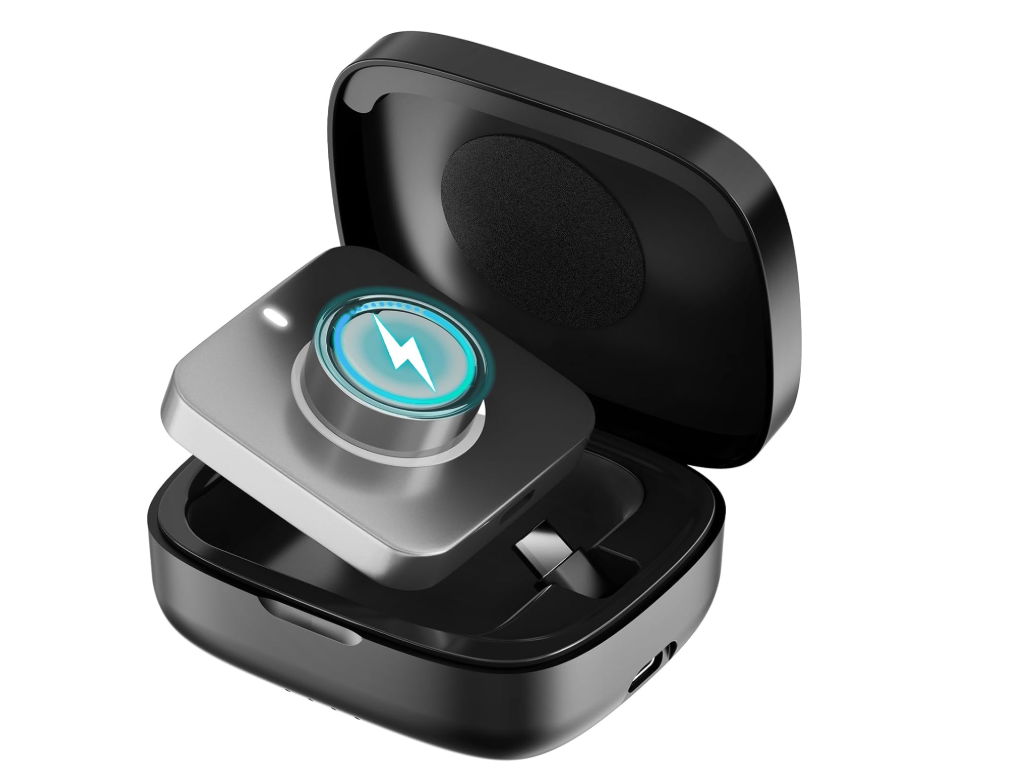
Buy Wireless Charging Case for Oura Ring Gen 4 & 3 Charger
Step-by-Step: Fix Oura Ring Battery Drain
- Check current firmware: Oura app → Profile → My Devices. Update if not on the latest version.
- Disable Background App Refresh (iOS: Settings → Oura → Background App Refresh OFF).
- Turn off Altitude Mode in Oura app settings if you do not need it.
- Charge the ring fully (to 100%) and run it completely flat once — this recalibrates the battery indicator.
- If still poor after a firmware update and recalibration, perform a factory reset (see Section 9).
- If battery drains below 50% in under 24 hours after a factory reset, contact Oura support — this is a hardware fault.
Related: Oura Ring 4 Battery Life — What to Expect
2. Oura Ring Not Syncing — How to Fix
Sync failures are the second most reported Oura Ring problem. The ring stores up to 6 weeks of raw data locally, so a brief sync failure will not cause data loss — but you will not see updated scores in the app until sync completes.
Common Causes of Oura Ring Sync Failure
- Bluetooth is turned off on your phone
- The Oura app is outdated and incompatible with current firmware
- Your phone has low available storage (under 500 MB free)
- The ring is out of Bluetooth range (more than ~10 metres from phone)
- Another Bluetooth device is interfering with the connection
- The Oura app’s local cache is corrupted
How to Force-Sync the Oura Ring
- Ensure Bluetooth is enabled on your phone.
- Open the Oura app and pull down on the home screen to force a manual sync.
- If that fails, close the app fully (swipe away from app switcher) and reopen it.
- Toggle Bluetooth off for 10 seconds, then back on — this clears Bluetooth cache.
- Restart your phone. This resolves the majority of persistent sync failures.
- If still failing: uninstall the Oura app, restart your phone, and reinstall from the App Store / Google Play.
- Check that your phone’s OS is up to date — Oura requires iOS 16+ or Android 11+.
| ℹ️ Data Safe During Sync Failures The Oura Ring stores up to 6 weeks of raw biometric data internally. Even if the app fails to sync for several days, no data is lost. Once sync is restored, all missing days will populate in the app automatically. |
See also: Common Oura Ring 4 Problems (Overview) | How Does the Oura Ring Work?
3. Inaccurate Sleep Data & Heart Rate Issues
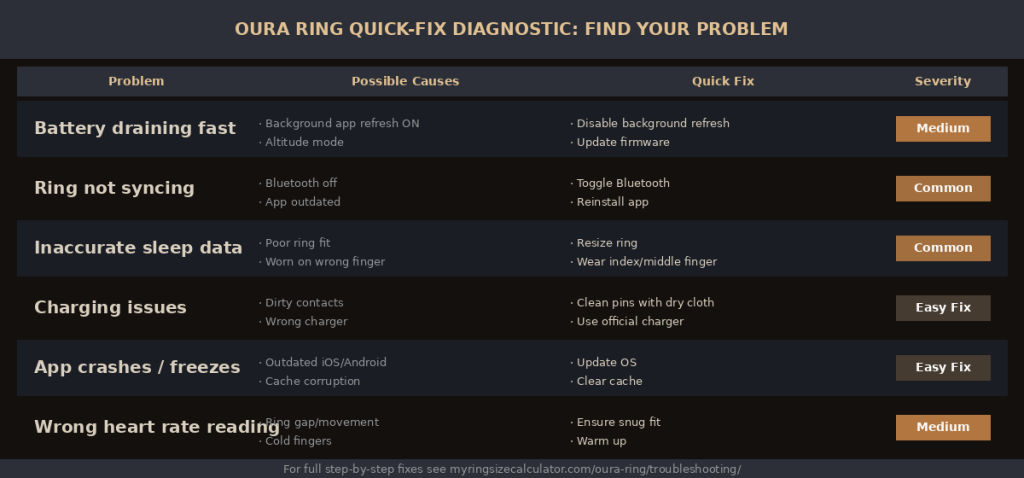
Quick-fix diagnostic: find your Oura Ring problem and the recommended solution at a glance.
Inaccurate biometric data is frustrating, but in most cases it is caused by a correctable physical issue — primarily ring fit, finger placement, or skin contact quality — rather than a hardware defect. You can evaluate your setup using the Oura ring sizing guide to rule out fit-related anomalies.
Why Is My Oura Ring Sleep Tracking Wrong?
| Symptom | Most Likely Cause | Solution |
| Shows awake when I was asleep | Ring moved / gap from finger during sleep | Try a smaller ring size or wear on index finger |
| Sleep stages look wrong | Ring worn on incorrect finger | Wear on index or middle finger, sensors facing palm |
| Sleep score much lower than expected | Irregular sleep schedule confusing baseline | Allow 2–3 weeks for personalised baseline to calibrate |
| HRV readings very erratic | Ring too loose; poor skin contact | Ensure ring sits flush — no gap between sensors and skin |
| No sleep recorded at all | Ring ran out of battery mid-sleep | Charge to 100% before bed; battery life 5–8 days |
| Heart rate looks impossibly high/low | Movement artefacts during light sleep | This is normal; check average overnight HR instead |
Improving Oura Ring Heart Rate Accuracy
The Oura Ring Gen 4 uses an 18-pathway PPG sensor system that is significantly more accurate for dark skin tones than the Gen 3. However, heart rate accuracy during active workouts remains lower than during passive/sleep tracking because of motion artefacts — this is a physical limitation of optical HR from a ring, not a defect.
- For sleep HR: ensure a snug fit with no gap between the inner sensors and your finger.
- For daytime HR: manually tag workouts in the app so Oura applies workout-specific algorithms.
- For HRV accuracy: the ring captures HRV data during the lowest-HR period of sleep — this is normal and intentional.
Research: Oura Ring Accuracy — Published Validation Studies (Nature npj) | Oura Ring Features & Tracking Guide
4. Oura Ring Charging Problems
Charging problems are almost always caused by one of three issues: dirty charging contacts, a faulty cable, or using an incompatible power source. The Oura Ring charges via a magnetic USB-C dock — it does not use wireless (Qi) charging.
Oura Ring Won’t Charge — Step by Step
- Inspect the charging contacts on the ring and dock for debris, moisture, or corrosion. Wipe with a dry, lint-free cloth, keeping up with guidelines found on what are some common oura ring 4 problems.
- Try a different USB-C cable — cheap or third-party cables frequently cause intermittent charging failures.
- Try a different power source: wall adapter, laptop USB port, or a different USB-C hub.
- Ensure the ring is placed correctly in the dock — the inner surface should face down, sensors making contact with the dock pins.
- Leave the ring on the charger for 30 minutes. If the battery is fully depleted, it may show no indicator for the first 10–15 minutes.
- Check the charging LED indicator: solid white = charging; flashing white = low battery; no light after 30 min = hardware issue.
- If none of the above work, the charging contacts may be damaged — contact Oura support.
| ⚠️ Do Not Use Wireless Chargers The Oura Ring does NOT support Qi wireless charging. Placing it on a wireless charging pad will not charge the ring and may cause interference with the sensors. Always use the official Oura magnetic USB-C dock. |
5. Oura Ring App Crashes & Software Bugs
Software bugs and app crashes are typically resolved by updating the app or clearing the local cache. The Oura app is updated frequently — staying current with both app and firmware versions is the single most effective way to avoid software-related issues, or by reviewing an oura ring gen-4 review for recent update performance.
Oura App Not Working — Fixes by Symptom
| App Symptom | Fix |
| App crashes on open | Update iOS/Android OS → Update Oura app → Reinstall if still crashing |
| No data showing in app | Force-sync: pull down on home screen → restart phone if sync fails |
| Readiness/Sleep score missing | Check ring battery — scores only generate after 4+ hrs sleep data |
| App shows ‘connection lost’ | Toggle Bluetooth → Move ring within 1m of phone → Restart both |
| Notification not working | iOS: Settings → Oura → Notifications → Allow. Android: App Info → Notifications |
| App won’t log in | Check account email; try password reset at cloud.ouraring.com |
| Steps/activity not recording | Grant Motion & Fitness permission (iOS) or Physical Activity (Android) |
| Dark mode / theme broken | Update app; clear app cache (Android) or reinstall (iOS) |
Community fixes: r/ouraring — App Troubleshooting Thread | Oura Support Centre
| ▶ Video: Oura Ring Troubleshooting — Top 5 Fixes (YouTube) Watch a hands-on walkthrough of the most common Oura Ring problems and how to fix them — covering battery, sync, app, and charging issues. Recommended channels: DC Rainmaker · The Quantified Scientist · Oura Official YouTube |
6. Oura Ring Fit & Comfort Problems
Fit problems are uniquely important for the Oura Ring because a poor fit directly degrades sensor accuracy — a ring that is too loose cannot maintain reliable optical contact with the skin.. Comfort matters too, since the ring is designed to be worn 24 hours a day, much like models analyzed in the oura ring 3 vs 4 thickness comparison.
Ring Feels Too Loose
A ring that moves or rotates on your finger will produce gaps between the sensors and your skin, causing inaccurate HRV, heart rate, and temperature readings. If your ring is between sizes, Oura recommends sizing down. You can order a new replacement ring at a discounted rate if you contact Oura support within the warranty period.
Ring Feels Too Tight
Fingers swell during sleep, after exercise, in warm weather, and during illness or hormonal changes. If your ring is consistently uncomfortable, consider sizing up. A ring that is too tight is also not dangerous — the Oura Ring does not constrict circulation the way a metal ring can, as it is specifically designed with a rounded inner surface to distribute pressure evenly.
Ring Causes Skin Irritation
Titanium allergies are extremely rare. If you notice redness or irritation, it is more likely caused by moisture trapped under the ring during sweaty activities. Remove the ring after intense workouts, dry both the ring and your finger thoroughly, and reapply. If irritation persists, consult a dermatologist.
Sizing resource: Oura Ring Size Guide — How to Get the Right Fit | Oura Ring Buying Guide
7. Oura Ring Accuracy Problems Explained
It is worth distinguishing between genuine sensor inaccuracy and data that simply looks unexpected because you are not yet familiar with how Oura measures and reports biometrics, especially when contrasting oura ring gen-4 vs gen-3 vs galaxy ring comparison.
Sleep Staging: What’s Normal vs. What’s a Problem
Consumer sleep trackers — including the Oura Ring — use actigraphy (movement) and photoplethysmography (optical HR) to infer sleep stages, not direct EEG brainwave measurement. A 2023 validation study in npj Digital Medicine found Oura achieved 79% sleep stage accuracy compared to gold-standard polysomnography. That means roughly 1 in 5 epochs may be misclassified — this is normal, not a defect.
HRV: Why Your Number Seems Low
HRV values vary enormously between individuals — a reading of 20ms and a reading of 100ms can both be completely healthy depending on the person. Oura reports your HRV relative to your own personal baseline, not against population averages. A low absolute HRV number is not a problem unless it is below your own established baseline trend.
Body Temperature: Relative, Not Absolute
Oura measures temperature deviation from your personal baseline, not your actual skin or core temperature. Seeing +0.5°C does not mean you have a fever — it means your temperature is 0.5°C higher than your recent nightly average. Deviations of ±1°C are typically within normal variation.
Science: Wikipedia: Photoplethysmography | NIH: Wearable Accuracy Research | Does Oura Ring Detect Sleep Apnea?
8. Oura Ring Sensor & Hardware Faults
Genuine hardware faults are relatively uncommon with the Oura Ring Gen 4, but they do occur. The following are hardware-level problems that cannot be fixed by software updates or user adjustments and require contacting Oura support, matching details outlined in benefits of oura ring 4.
- Temperature sensor reading constant extreme values (+2°C or more every night)
- SpO₂ / blood oxygen sensor not activating or always showing ‘–‘
- Ring showing charging indicator but battery never increases above 10%
- Physical damage: cracked titanium shell, bent sensor array, or scratched inner surface
- Ring completely unresponsive — won’t pair, charge, or show any LED indicators
- Severe data gaps — consistently missing entire nights of data after correct placement
The Oura Ring Gen 4 carries a 1-year limited warranty against manufacturer defects. If you experience any of the above symptoms and your ring is within the warranty period, Oura will typically offer a replacement unit. Contact Oura support at support.ouraring.com.
External: Oura Help Centre — Hardware Issues | BBC: Smart Ring Technology Explained
9. How to Factory Reset the Oura Ring
A factory reset erases all locally-stored data on the ring and resets it to its out-of-box state. All historical data synced to the Oura cloud is preserved. Perform a factory reset as a last resort after other troubleshooting steps have failed, or explore the oura ring 4 release date context for generation-specific reset steps.
| ⚠️ Before You Reset Force a manual sync before performing a factory reset (pull down on app home screen). This ensures all recent data is uploaded to the Oura cloud and will not be lost. Data that has never synced to the cloud will be permanently deleted by a factory reset. |

Factory Reset Steps (iOS & Android)
- Open the Oura app and tap Profile (bottom-right corner).
- Tap My Devices and select your ring.
- Scroll to the bottom and tap Factory Reset.
- Confirm the reset when prompted. The ring will vibrate twice.
- Wait 2 minutes for the reset to complete — the ring LED will flash white.
- Re-pair the ring: tap + Add Device in the app and follow the pairing instructions.
- Allow 24 hours for your personal baselines to recalibrate after the reset.
Factory Reset via Physical Method (If App Is Inaccessible)
- Place the ring on the charger.
- Press and hold the charging case button (if your dock has one) for 10 seconds.
- Alternatively, contact Oura support for a forced remote reset if app access is completely unavailable.
More help: Oura Ring Gen 4 Full Review | How Does Oura Ring 4 Work?
10. When to Contact Oura Support
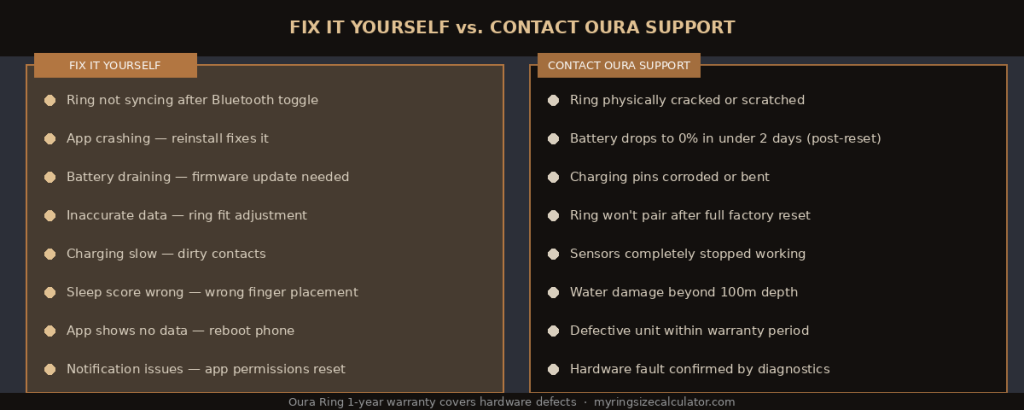
Use this guide to decide whether your Oura Ring problem is self-fixable or needs official support.
Most Oura Ring problems are fixable at home. Contact Oura support when you have exhausted all self-troubleshooting steps, or when a hardware defect is clearly present, keeping perspective on the differences analyzed in oura ring 3 vs 4.
Contact Oura Support If:
- Your ring is physically damaged (cracked, bent sensors, corroded contacts)
- Battery drains from 100% to 0% in less than 2 days after a factory reset
- The ring is completely unresponsive to charging or pairing
- A sensor has completely stopped working (temperature always ‘–‘, SpO₂ never records)
- You are within the 1-year warranty period and experiencing consistent data failures
How to Reach Oura Support
| Channel | Details | Response Time |
| Help Centre | support.ouraring.com — self-service articles and ticket submission | Ticket: 1–3 business days |
| In-App Support | Oura app → Profile → Help & Support → Contact Support | 1–3 business days |
| Community Forum | community.ouraring.com — peer-to-peer help from other users | Hours to days |
| r/ouraring — unofficial but very active community | Often within hours |
Community: r/ouraring Reddit Community (140k+ members) | Oura Official Support
11. Frequently Asked Questions About Oura Ring Problems
Q: Why is my Oura Ring not tracking sleep?
A: The most common causes are a ring that is too loose (losing sensor contact), low battery (ring died mid-sleep), or the wrong finger position. Ensure the ring fits snugly on your index or middle finger with no gap between the sensors and your skin. If the issue persists after adjusting fit, perform a factory reset, or read up on how do smart rings work.
Q: Why does my Oura Ring show the wrong time zone?
A: The Oura Ring syncs its time zone from your phone’s location. If you have travelled, open the Oura app and allow it to sync — it will automatically update the time zone from your phone’s GPS. If it still shows the wrong zone, go to Profile → Settings → Time Zone and update manually.
Q: My Oura Ring got wet. Is it damaged?
A: The Oura Ring Gen 4 is rated to 100 metres (10 ATM) water resistance and is safe for swimming, showering, and bathing. If the ring has been exposed to salt water or chlorine, rinse it with fresh water and dry it before charging. Salt and chlorine can cause long-term contact corrosion if left to dry on the charging pins.
Q: Why is my Readiness Score always low?
A: A consistently low Readiness Score indicates one of three things: chronic sleep debt, high resting heart rate relative to your baseline, or low HRV trend. It can also be caused by a ring fit issue producing artificially inflated HR readings. If the score seems incorrect, check your ring fit first, then review your sleep schedule and recent activity load.
Q: Can I use the Oura Ring if I have a pacemaker?
A: Oura has not published specific guidance on pacemaker compatibility. The ring emits Bluetooth (2.4 GHz) and uses optical sensors. As a precaution, consult your cardiologist before using any wearable with Bluetooth near a cardiac device. See relevant guidance from the American Heart Association or your device manufacturer.
Q: How do I know if my Oura Ring needs a replacement?
A: Signs that indicate a ring may need replacement: physical damage visible to the naked eye, battery capacity below 50% of rated life after a factory reset and firmware update, a sensor that has completely stopped producing data, or consistent data gaps that persist after all troubleshooting steps.
Q: Is it normal for the Oura Ring to feel warm while charging?
A: Yes — slight warmth during charging is normal for lithium-ion batteries. The ring should not feel hot to the touch. If it becomes uncomfortably hot during charging, remove it from the charger immediately and contact Oura support, as excessive heat can indicate a battery fault.
Q: Does Oura Ring track blood pressure?
A: No — the Oura Ring does not measure blood pressure. It measures heart rate, HRV, SpO₂, body temperature, and activity metrics, but blood pressure requires a cuff-based device. See our dedicated article: Does Oura Ring Measure Blood Pressure?
12. Oura Ring Problem Prevention Tips
Most Oura Ring problems are avoidable with a few consistent maintenance habits. Following these tips will maximise accuracy, extend the life of your ring, and reduce the need for troubleshooting.
Daily Habits
- Keep firmware and app updated — Oura releases patches frequently that fix known bugs.
- Charge the ring every 4–5 days rather than letting it fully discharge — partial charges extend battery lifespan.
- Rinse the ring with fresh water after swimming in salt water or chlorinated pools.
- Dry the charging contacts before placing the ring on the dock — moisture on pins causes charging failures.
Weekly Habits
- Clean the ring with a damp, lint-free cloth to remove dead skin cells from the sensor array.
- Check that the ring still fits snugly — finger size changes with weight, season, and health status.
- Review your Oura app for any unusual data anomalies that might indicate a fit or placement issue.
Avoid These Common Mistakes
- Do not wear the ring during contact sports — impact can damage the sensor array.
- Do not use third-party chargers or cheap USB-C cables — these cause the majority of charging failures.
- Do not clean with alcohol, solvents, or abrasive materials — use only water and a soft cloth.
- Do not ignore firmware update notifications — many bugs are fixed within days of being reported.
Further Reading & External Resources
On this site: Oura Ring Complete Guide (Hub) | Oura Ring Features Hub | Oura Ring Gen 4 Review | Oura Ring Gen 3 vs Gen 4
External: Oura Official Support Centre | r/ouraring Reddit | Wikipedia: Actigraphy (Sleep Tracking Science) | NIH: Wearable Devices in Health Research | BBC: How Smart Rings Are Changing Health Tracking
| ⚕️ Medical Disclaimer Information in this guide is for general troubleshooting and informational purposes only. The Oura Ring is a consumer wellness device, not an FDA-cleared diagnostic tool. If you experience health concerns suggested by your ring data, consult a qualified healthcare professional. Do not self-diagnose or self-treat based on wearable data alone. |
| 💰 Price Disclaimer Prices mentioned in this article are approximate averages based on publicly available information at the time of writing. Actual prices may vary depending on the retailer, region, and available promotions. Pricing fluctuates with market demand, seasonal trends, and brand updates. Always check the official Oura website or your preferred retailer for the most current pricing before making a purchase decision. |