
The quick answer
Don’t size an Oura Ring Sizing using a regular jewelry ring or a standard ring size chart — Oura uses its own numbering scale that doesn’t match standard US sizes even when the numbers look identical, and there are no half sizes. The reliable method is Oura’s free sizing kit: it ships before your actual ring, includes plastic test rings, and you confirm your fit before the real order goes out.
- Most accurate method: order the free sizing kit and test for a few hours before choosing
- Best fingers for tracking accuracy: index, middle, or ring finger — avoid a finger with a noticeably large knuckle if you can
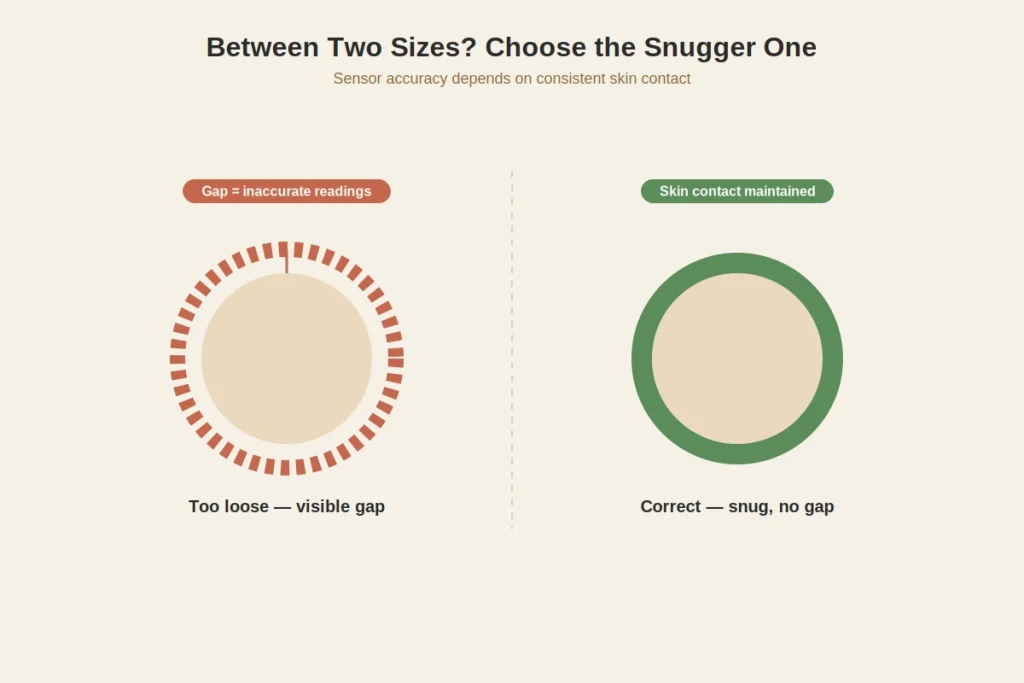
- If between two sizes: go with the snugger one — Oura’s sensors need close skin contact to read accurately
- Don’t have a sizing kit yet? Our general ring size conversion chart can get you a rough starting estimate, but treat it as a placeholder, not a final answer, for this specific product
Why Oura ring sizing isn’t the same as regular ring sizing
This trips up more people than anything else in the process: a US jewelry size 6 and an Oura size 6 are not the same physical size — Oura’s ring runs smaller at the same labeled number, and the scale itself is proprietary rather than borrowed from a standard sizing system. Ring generations complicate this further. Oura Ring 5 ships in sizes 6 through 13, while Oura Ring 4 covers a wider 4 through 15 range, and the two generations don’t share a sizing chart because the internal shape changed between them.
The practical takeaway: if you already own an Oura Ring in one generation and you’re upgrading, don’t assume your old size carries over. Re-size for the new generation rather than guessing.
How to use Oura’s free sizing kit
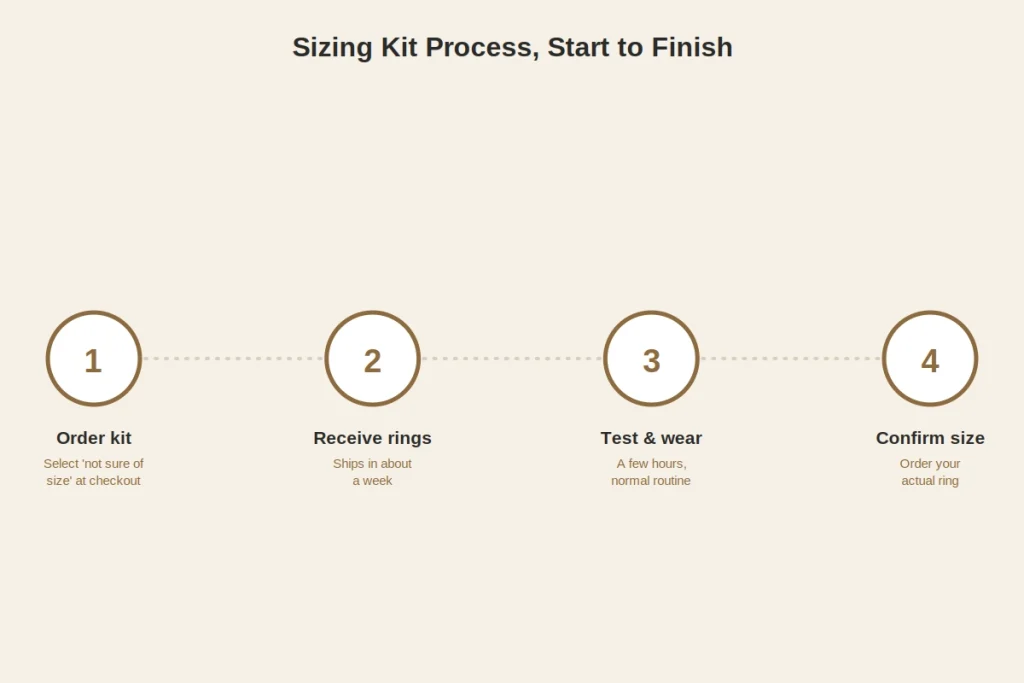
- Start an order and select “not sure of your size” at checkout instead of picking a size blind — this triggers the sizing kit to ship first, ahead of your actual ring.
- Wait for the kit to arrive, typically within about a week depending on your location.
- Test each candidate ring on your target finger — usually the index or middle finger of your dominant hand for the best sensor accuracy, though either hand works.
- Wear each size for a few hours, ideally including some part of your normal routine — the fit that feels right sitting still can feel different after typing, exercising, or sleeping.
- Run the fit test below on whichever size feels closest, then confirm that size at checkout.
- You don’t need to return the sizing kit — recycle it or pass it along once you’ve picked a size.
If you’d rather not wait for a kit at all, the fallback is measuring the inside diameter of a ring you already own that fits your target finger well — but treat that as a rough starting point only, since it’s measuring a different sizing system entirely, not a direct conversion.
The fit test that actually matters
Once you have a candidate size on your finger, run through these four checks rather than relying on how it looks:
- Knuckle pass test. The ring should clear your knuckle with light-to-moderate resistance — not glide over with zero effort (too large), and not require force or cause pain (too small).
- Base fit test. Once past the knuckle, it should sit snugly at the base of your finger without spinning freely when you shake your hand gently.
- All-day comfort. Wear the candidate size through a few hours of normal activity, not just a static test — swelling from exercise, typing, or heat changes the fit more than people expect.
- Skin contact check. Because the sensors read from the underside of the ring, there shouldn’t be a visible gap between the ring and your skin when you make a loose fist.
If a size passes the knuckle test but feels loose at the base, or the reverse, you’re between sizes — see below for what to do about that.
What if you’re between two sizes?
Choose the smaller of the two. This isn’t just a tie-breaker rule — Oura specifically recommends sizing down at the margin, for a few concrete reasons: the sensors need consistent contact with the underside of your finger to read accurately, a snugger fit keeps that contact stable through movement, and the plastic sizing rings tend to feel slightly stickier against skin than the finished ring, so the real thing typically wears a touch smoother than the test version suggested.
One more variable worth controlling for: your dominant hand is commonly about half a US size larger than your non-dominant hand, and fingers measure smallest in the morning and largest in the evening or after heat and activity. If your test results are inconsistent, that’s often why — test at a few different times before deciding, and lean toward the size that worked when your finger was at its largest.
Choosing the right finger
Oura’s own guidance points to the index, middle, or ring finger for the most reliable readings, on either hand. A few practical notes worth factoring in beyond raw accuracy:
- Avoid your primary typing or writing fingers if you can, since a smart ring worn there takes more daily impact and friction than a piece of jewelry would.
- A noticeably large knuckle relative to your finger base makes any ring harder to size well, Oura included — if that’s the case for you, the fit test above matters even more than the sizing kit’s initial suggestion.
- If you already wear other rings, keep wearing them during the sizing kit trial — a ring stacked next to another one can fit differently than it would alone.
Frequently asked questions
Can I use my regular ring size to order an Oura Ring?
Not reliably. Oura’s sizing scale doesn’t match standard US, UK, or EU jewelry sizing, even where the numbers look similar, and the company explicitly advises against sizing from another ring. Use the free sizing kit or, at minimum, the physical fit test above.
Are Oura Ring 4 and Oura Ring 5 the same size chart?
No — Ring 5 runs sizes 6 through 13 with a redesigned interior, while Ring 4 covers 4 through 15. If you’re upgrading between generations, re-run the sizing process rather than reusing your old size.
How do I check what size Oura Ring I currently have?
The size is marked on the inside of the band, opposite the sensors. You can also find it in the Oura app — open the icon in the top-right corner of the Today tab, go to My Devices, and select your ring.
What if my Oura Ring doesn’t fit after I receive it?
Reach out to Oura’s support team directly — sizing exchanges are a normal part of the process, and they’d rather resolve a fit issue than have an inaccurate reading go unnoticed. Don’t try to force a fix with a ring adjuster or spacer first, since that can interfere with sensor contact.
Does a wider finger need a different sizing approach?
Not a different approach, just more attention to the knuckle-pass test specifically — a ring sized purely to clear a wide knuckle can end up loose at the base, so you may be choosing a compromise size rather than a perfect fit on both counts. This is common enough that it’s worth testing two adjacent sizes rather than assuming the first one that clears your knuckle is correct.