
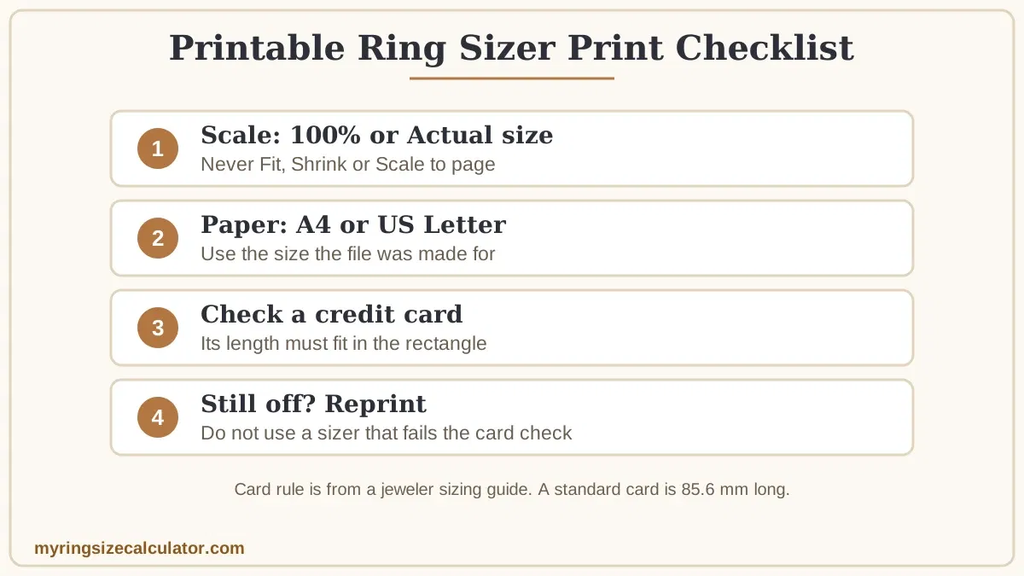
A printable ring sizer is only accurate if it prints at 100% scale. Set the print scale to 100% or Actual size, turn off any fit-to-page option, then lay a credit card on the sheet. If the card’s length does not fit the printed rectangle, the scale is wrong and you should reprint.
How to Print a Ring Sizer at the Correct Size
- Open the sizer as a PDF.
- In the print dialog, choose 100% scale or Actual size.
- Turn off options such as Fit, Shrink to fit and Scale to page.
- Use the paper size the sizer was made for, such as A4 or US Letter.
- Print and check the scale with a credit card before you measure.
Cartier’s printable sizer gives the same advice: set the guide to 100% scale and print it on A4, then check the print against a credit card or bank card. If the card’s length fits in the rectangle, the scaling is accurate. If it does not, the print is not at the correct scale.
How to Check the Scale With a Credit Card
A standard bank card is 85.6 mm long and 53.98 mm wide. Lay the card on the printed scale box and compare. If the card is longer than the box, the sizer printed too small. If the card is shorter, the sizer printed too big. If your sizer has no card box, measure the printed ruler or reference line instead and compare it with the stated length.
Why a Printed Sizer Comes Out the Wrong Size
- Fit to page or Shrink to fit is switched on.
- The PDF viewer or browser scales the page to its margins.
- The file was made for A4 and printed on US Letter, or the other way round.
- A phone or tablet print preview applies its own scaling.
- The printer applies a borderless or custom scale setting.
How a Wrong Scale Changes Your Ring Size
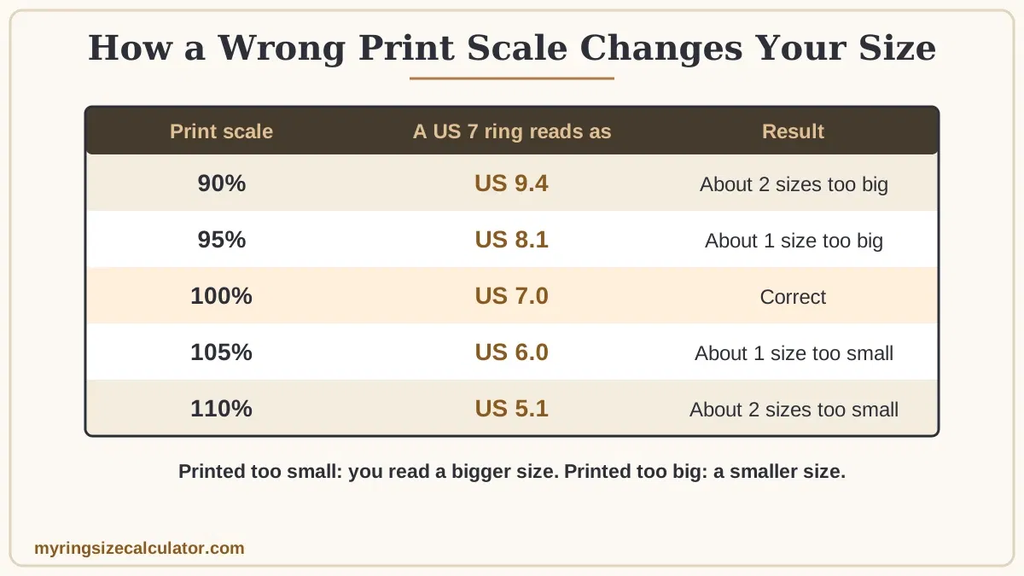
When the sizer prints too small, a ring appears to match a larger printed circle, so you read a bigger size. When it prints too big, you read a smaller size. The table shows how a ring that is truly US 7 would read at each scale.
| Print scale | A true US 7 ring reads as | Result |
|---|---|---|
| 90% | US 9.4 | About 2 sizes too big |
| 95% | US 8.1 | About 1 size too big |
| 100% | US 7.0 | Correct |
| 105% | US 6.0 | About 1 size too small |
| 110% | US 5.1 | About 2 sizes too small |
The figures use a US 7 inner diameter of 17.32 mm and the 0.8128 mm step per size, so a small scale error of 5% changes the result by about a full size. See the mm to ring size chart for the diameters.
What to Do If You Cannot Fix the Scale
- Reprint with the print dialog set to 100% or Actual size.
- Try a different PDF viewer or browser, or print from a computer instead of a phone.
- Measure the ring’s inner diameter in millimeters with a ruler and use the mm to ring size chart instead of the printed circles.
- Order a free or physical sizer. See how to get a free ring sizer.
After You Print a Correct Sizer
Follow our guide on how to use a printable ring sizer. Cartier’s method is to place the ring flat on the circles, start with the smallest, and find the circle that fills the ring’s interior fully. If you hesitate between two sizes, it suggests choosing the larger one. For more on accuracy, read do printable ring sizers work and how to measure your ring size. An on-screen alternative is covered in ring sizer apps: do they actually work.
You can download our own sizer from the printable ring size chart.
Frequently Asked Questions
Why is my printed ring sizer too small?
Usually because a fit-to-page or shrink option was on, or a PDF viewer scaled the page. Reprint at 100% or Actual size.
How do I know my ring sizer printed correctly?
Lay a credit card on the scale box. If its length fits in the rectangle, the print is accurate.
Should I print a ring sizer on A4 or Letter?
Use the size the file was made for. Printing on a different size with scaling on will distort it.
What if my printed sizer is too big?
A sizer printed too big makes you read a smaller size. Reprint at 100% before you measure.
Can I correct a wrong print instead of reprinting?
It is safer to reprint. If you cannot, measure the ring’s inner diameter in millimeters and use a chart.
Is a printed sizer as accurate as a plastic one?
Only if the print scale is correct. A physical sizer has no scale to get wrong.
Source: Cartier printable ring sizing tool (PDF).
If a printout keeps giving you doubtful results, a physical gauge is more reliable – see the best ring sizer kits.