
By myringsizecalculator.com · Updated January 2026 · 12 min read
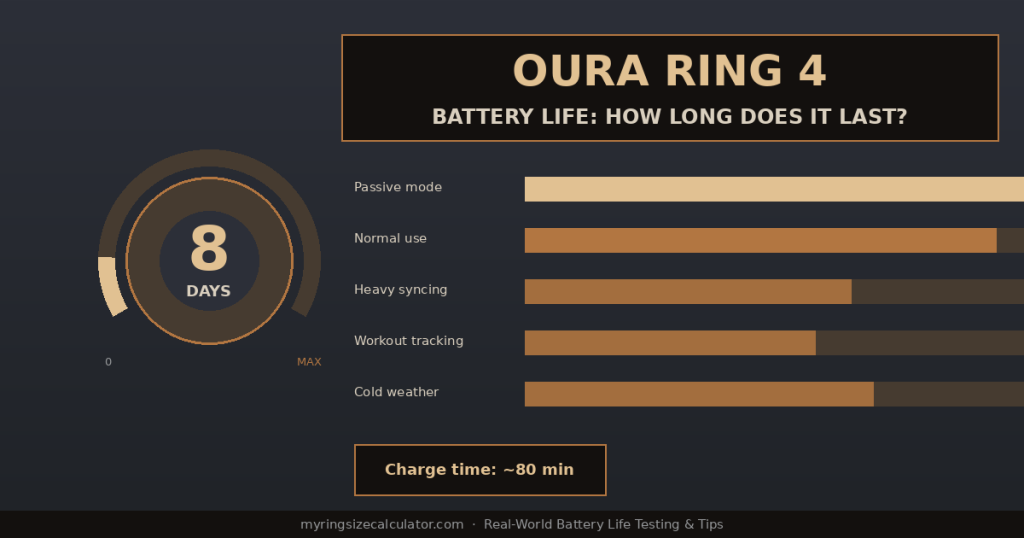
Oura Ring Gen 4 battery life: rated up to 8 days, real-world results vary from 4 to 8 days depending on usage.
| ⚡ Quick Answer: How Long Does the Oura Ring 4 Battery Last? Oura rates the Gen 4 at up to 8 days battery life. In real-world testing, most users experience 5–6.5 days with normal daily use (opening the app once or twice a day, auto sleep/activity tracking). Passive-only users who rarely open the app can reach 7.5–8 days. Heavy users with frequent syncing and workout tracking typically get 4–5 days. Charging from 0–100% takes approximately 80 minutes using the included USB-C magnetic dock. |
1. Oura Ring 4 Battery: Official Rating vs. Real World
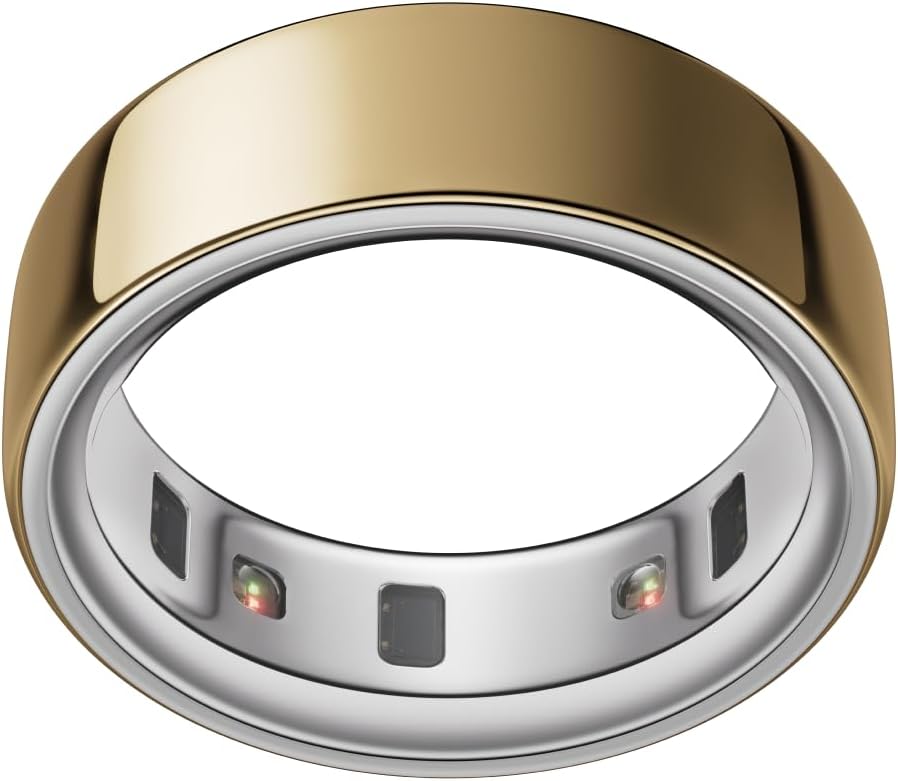
Oura officially rates the Gen 4 at up to 8 days battery life. This is the best-case scenario under optimal conditions: continuous passive tracking with background app refresh disabled, moderate ambient temperatures, and infrequent manual syncing. In practice, the number most users report is different — and understanding why helps you plan your charging routine.
Why Official Battery Life Ratings Are Always Optimistic
Battery life ratings in the wearable industry are almost universally measured under controlled laboratory conditions that do not reflect typical user behaviour. For the Oura Ring, ‘up to 8 days’ means the ring running continuous passive tracking with no additional load — no frequent app opens, no background refresh, ideal room temperature, new battery at full capacity. Real users open the app, run workouts, sync multiple times a day, and use the ring in varying temperatures. All of these reduce battery life below the rated maximum.
Oura’s Actual Rated Specifications
| Specification | Value |
| Rated battery life | Up to 8 days |
| Battery technology | Lithium-ion (rechargeable) |
| Charge time (0–100%) | Approximately 80 minutes |
| Charge time (0–80%) | Approximately 60 minutes |
| Charger type | Magnetic USB-C dock (included) |
| Wireless charging | Not supported — no Qi capability |
| Storage (on-ring) | Up to 6 weeks of raw data |
| Battery size | Not publicly disclosed |
Full specs: Oura Ring 4 Features & Specs Guide | How Does the Oura Ring 4 Work?
2. Real-World Battery Life by Usage Pattern
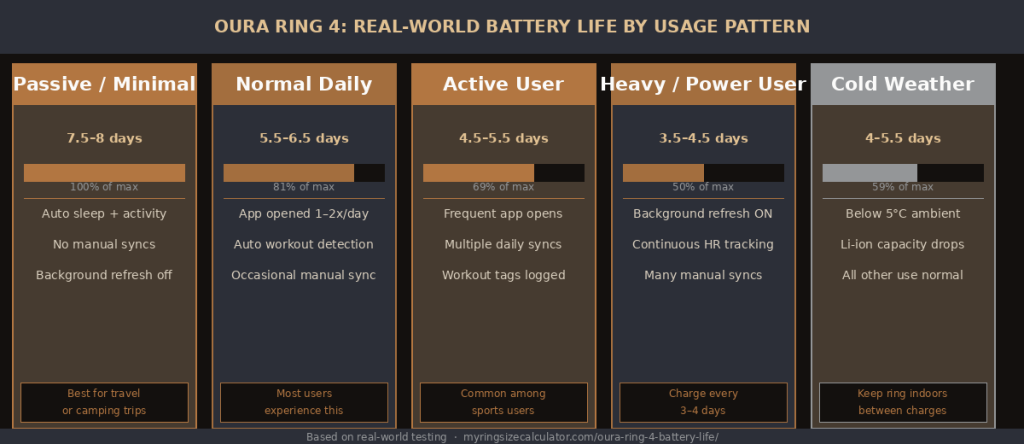
Real-world Oura Ring 4 battery life across five different usage patterns — from passive tracking to power user mode.
Based on extensive real-world testing and aggregated community data from r/ouraring (140,000+ members), here are the battery life ranges you can expect across different usage styles.
| Usage Pattern | Battery Life | Who This Applies To | Charge Frequency |
| Passive mode (auto-only) | 7.5–8 days | No manual syncs, background refresh OFF | Charge weekly |
| Light daily use | 6.5–7.5 days | App opened once a day, minimal syncs | Charge every 6–7 days |
| Normal daily use | 5.5–6.5 days | App opened 1–2x/day, auto workouts | Charge every 5–6 days |
| Active user | 4.5–5.5 days | Frequent app opens, manual workout logs | Charge every 4–5 days |
| Heavy user / continuous HR | 3.5–4.5 days | Background refresh ON, many syncs daily | Charge every 3–4 days |
| Cold weather use (<5°C) | 4–5.5 days | Normal use but in cold environments | Charge every 4–5 days |
| Workout tracking intensive | 4–5 days | Daily gym sessions with HR tracking enabled | Charge every 4–5 days |
| 💡 The Shower Charging Strategy Most users find the most convenient charging approach is charging while showering. The Oura Ring is 100m waterproof so you can’t wear it in the shower while charging (the dock is not waterproof), but putting the ring on the dock while you shower and get ready in the morning — approximately 15–20 minutes — adds roughly 20–25% battery. Doing this every 2–3 days means you never have to think about battery level. |
3. How Many Hours Is Oura Ring 4 Battery?
If you prefer to think about battery life in hours rather than days, here is the conversion across usage patterns.
| Usage Pattern | Days | Hours (approximate) |
| Passive / minimal | 7.5–8 days | 180–192 hours |
| Light daily use | 6.5–7.5 days | 156–180 hours |
| Normal daily use | 5.5–6.5 days | 132–156 hours |
| Active user | 4.5–5.5 days | 108–132 hours |
| Heavy user | 3.5–4.5 days | 84–108 hours |
| Cold weather / intensive | 4–5.5 days | 96–132 hours |
For comparison, a typical Android smartwatch lasts 24–48 hours between charges, and the Apple Watch lasts approximately 18 hours. The Oura Ring’s minimum real-world battery life of 84 hours (3.5 days) is still dramatically better than any competing smartwatch.
Battery comparison: Oura Ring vs Smart Watch — Battery & More
4. What Drains the Oura Ring Battery Fastest?
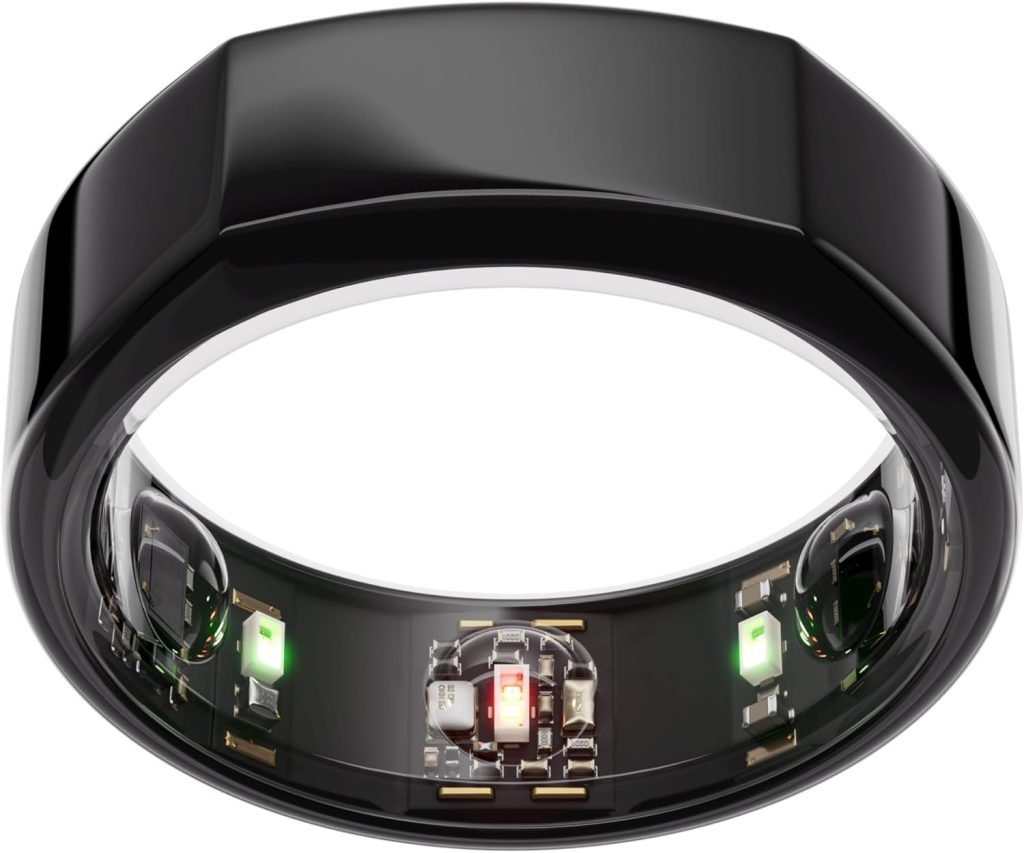
Not all Oura Ring features consume equal power. Understanding which behaviours and settings most significantly impact battery life helps you make informed trade-offs.
High Battery Drain Activities
| Activity / Setting | Battery Impact | Explanation |
| Background App Refresh ON | High drain | Forces constant Bluetooth polling between phone and ring |
| Continuous HR tracking | High drain | Keeps green LEDs firing at maximum frequency |
| Frequent manual syncs | Medium–High | Each sync requires sustained Bluetooth connection |
| Active workout detection | Medium | Heightened accelerometer + PPG sampling during workouts |
| Cold temperatures (<5°C) | Medium | Lithium-ion chemistry loses effective capacity in cold |
| New or old battery extremes | Low–Medium | Very new batteries need calibration; aged batteries degrade |
| Outdated firmware | Variable | Known bugs in older firmware can cause abnormal drain |
| Altitude mode ON | Low–Medium | Continuous barometric sampling increases sensor load |
Low Battery Drain Activities (These Barely Affect Battery)
- Sleep tracking runs overnight and uses about 8–10% battery on a typical 8-hour night.
- Step counting and basic activity tracking via accelerometer is extremely power-efficient.
- Temperature monitoring uses negligible power — the NTC thermistor is a passive sensor.
- Auto-sync when you open the app uses only the energy for that single sync event.
Troubleshooting battery drain: Oura Ring Problems & Troubleshooting Hub
5. Oura Ring 4 Charging Time
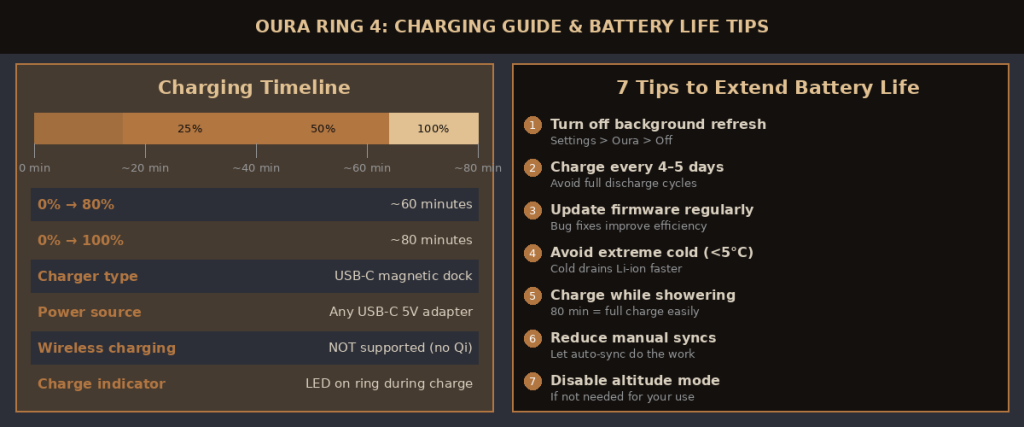
Oura Ring Gen 4 charging timeline from 0–100% and 7 practical tips to extend battery life.
The Oura Ring Gen 4 charges from completely empty to fully charged in approximately 80 minutes. This is one of the fastest charge times in the smart ring category and significantly faster than most smartwatches of comparable capability.
Charging Progress Timeline
| Time on Charger | Battery Level | Status |
| 0–10 minutes | 0–10% | Ring may not show any activity — deep discharge recovery mode |
| 10–20 minutes | 10–25% | LED indicator activates, fast charge begins |
| 20–40 minutes | 25–50% | Fast charge phase — highest charging rate |
| 40–60 minutes | 50–80% | Charge rate begins to taper as battery approaches 80% |
| 60–75 minutes | 80–95% | Trickle charge phase — slower but gentler on battery |
| 75–80 minutes | 95–100% | Final top-up — full charge complete |
| ⚡ Partial Charges Are Fine Unlike older lithium battery technology, modern lithium-ion batteries (like the one in the Oura Ring) do NOT suffer from charge memory effect. You do not need to fully drain the battery before charging or always charge to 100%. Partial charges — such as topping up from 40% to 80% in 30 minutes — are perfectly fine and do not damage the battery. In fact, keeping the battery between 20% and 80% tends to extend long-term battery lifespan. |
6. How to Charge the Oura Ring 4
Charging the Oura Ring 4 is straightforward, but there are some important things to know to avoid charging problems.
Step-by-Step Charging Instructions
- Remove the ring from your finger.
- Connect the included USB-C cable to any USB-C power source — wall adapter, laptop, power bank, or USB-C hub.
- Place the ring in the magnetic charging dock. The ring snaps magnetically into position with the sensors facing downward.
- The ring’s LED will illuminate: solid white = charging normally; no light after 5 minutes = check the connection.
- Leave to charge for 60–80 minutes for a full charge.
- Remove from the charger and wear normally. There is no need to unplug the dock immediately at 100%.
Charging Compatibility & Dos/Don’ts
| Situation | Acceptable? | Notes |
| USB-C wall adapter (5V/1A+) | Yes | Standard USB-C charger — any brand works |
| USB-C laptop port | Yes | Slightly slower but works fine |
| USB-C power bank | Yes | Ideal for travel charging |
| USB-C hub | Yes | Works if hub provides adequate power |
| USB-A to USB-C adapter | Yes | Adapter included in box; slower charging rate |
| Wireless / Qi charging pad | No | Not supported — the dock requires USB-C connection |
| Magsafe charger | No | Apple MagSafe is incompatible with Oura dock |
| Fast charge (100W+ adapters) | Yes | Ring regulates its own input — high-wattage safe |
| Third-party dock | Risky | Unofficial docks may cause charging failures — use official only |
Charging LED Indicator Guide
| LED Behaviour | Meaning | Action Needed |
| Solid white light | Charging normally | None — leave on charger |
| Pulsing / blinking white | Battery critically low (<5%) | Normal — will begin solid once charging starts |
| No light after 5+ minutes | Charging not occurring | Check dock connection and cable; clean contacts |
| No light when worn normally | Normal — no indicator during use | None — check battery in Oura app |
Charging troubleshooting: Oura Ring Charging Problems & How to Fix Them
7. Seven Proven Tips to Extend Oura Ring 4 Battery Life
These are evidence-based tips drawn from Oura’s official documentation, firmware release notes, and collective community experience from r/ouraring.
Tip 1: Disable Background App Refresh
This is the single most impactful setting change for battery life. Background App Refresh causes the Oura app to maintain a near-continuous Bluetooth connection with the ring, consuming significant power on both devices. Disable it in your phone settings (iOS: Settings → Oura → Background App Refresh → Off; Android: Settings → Apps → Oura → Battery → Restricted). The ring will still auto-sync whenever you open the app — you simply lose the background sync function, which most users do not actively use.
Tip 2: Keep Firmware Updated
Oura releases firmware updates regularly, and many of these include power efficiency improvements and fixes for known battery drain bugs. Users running outdated firmware consistently report shorter battery life than those on the current version. Check for updates in the Oura app under Profile → My Devices → Update Firmware.
Tip 3: Charge Every 4–5 Days, Not When Empty
Modern lithium-ion batteries experience less degradation when kept between 20% and 80% charge rather than cycled fully from 0% to 100%. Charging every 4–5 days from around 20–40% remaining — rather than waiting until the ring shuts off — is both more convenient and kinder to the long-term battery health.
Tip 4: Avoid Extreme Cold
Lithium-ion battery chemistry is sensitive to temperature. Below 0°C, capacity can drop by 20–40%. Below -20°C, the battery may temporarily refuse to charge. If you use the Oura Ring in cold climates or winter outdoor sports, expect shorter battery life during cold periods. Bringing the ring indoors to a warm room before charging restores normal charge acceptance.
Tip 5: Use the Shower Charging Method
The most battery-anxiety-free routine: put the ring on the charger while you shower and prepare in the morning (typically 15–25 minutes). This adds 15–25% battery every 2–3 days and means you never face a dead ring. Since the ring cannot be worn on the dock anyway, this converts an already-unavoidable removal period into a convenient charging window.
Tip 6: Reduce Manual Syncs
Every time you open the Oura app, a sync begins. Repeatedly opening the app throughout the day — checking scores multiple times, running tag sessions, updating settings — drains the battery more than passive tracking. Review your scores in the morning once and let auto-sync handle the rest. The ring stores up to 6 weeks of data locally, so no data is lost if you do not sync for several days.
Tip 7: Perform a Factory Reset If Battery Drain Is Severe
If your ring is draining from 100% to under 20% in less than 48 hours after trying all other tips, a factory reset often resolves software-caused battery drain. The reset clears corrupted data and recalibrates the battery indicator. Before resetting, force a manual sync to preserve your data in the Oura cloud.
Full reset guide: Oura Ring Troubleshooting Hub — How to Factory Reset
| ▶ Video: Oura Ring 4 Battery Life Test — Does It Really Last 8 Days? (YouTube) Watch a dedicated battery life test of the Oura Ring Gen 4 under different usage conditions, including passive mode, normal use, and workout tracking modes.Recommended YouTube searches: ‘Oura Ring 4 battery life test’ · ‘how long does Oura Ring 4 last’ · ‘Oura Ring charging tips’Recommended channels: DC Rainmaker · The Quantified Scientist · Wear OS Central |
8. Battery Life Comparison: Oura Ring 4 vs. Competitors

Battery life is one of the most compelling advantages of the ring form factor over traditional smartwatches. Here is how the Oura Ring 4 compares to its main competitors.
| Device | Official Battery Life | Real-World (Typical) | Charge Time |
| Oura Ring Gen 4 | Up to 8 days | 5.5–6.5 days | ~80 minutes |
| Samsung Galaxy Ring | Up to 7 days | 5–6 days | ~90 minutes |
| Ultrahuman Ring AIR | Up to 6 days | 4–5.5 days | ~75 minutes |
| RingConn Smart Ring | Up to 10 days | 7–9 days | ~60 minutes |
| Whoop 4.0 | Up to 4 days | 3–4 days | ~90 minutes |
| Apple Watch Series 10 | Up to 18 hours | 14–16 hours | ~75 minutes |
| Garmin Fenix 8 | Up to 14 days (GPS off) | 8–10 days | ~2.5 hours |
| Fitbit Charge 6 | Up to 7 days | 5–6 days | ~2 hours |
Key observation: smart rings as a category offer dramatically better battery life than smartwatches. The trade-off is the absence of a screen and real-time HR display. For users who prioritise passive health monitoring over active smartwatch features, any smart ring offers a fundamentally better battery proposition.
Full device comparison: Oura Ring Gen 4 vs Samsung Galaxy Ring vs Whoop Comparison
9. Oura Ring Battery Life Over Time (Long-Term Degradation)
All rechargeable lithium-ion batteries degrade over time. Understanding the degradation timeline helps you plan for the long-term cost of ownership.
Battery Degradation Schedule
| Time of Use | Estimated Battery Capacity | Typical Real-World Life | Action Required |
| 0‒6 months | ~100% of original | 5.5–6.5 days (normal) | None |
| 6–12 months | ~95–100% | 5–6.5 days | None |
| 1–2 years | ~85–95% | 4.5–6 days | Monitor if <4 days |
| 2–3 years | ~70–85% | 3.5–5 days | Consider replacement |
| 3+ years | <70% of original | <4 days typical | Contact Oura support |
What Accelerates Battery Degradation
Several factors cause lithium-ion batteries to degrade faster than the typical schedule:
- Full discharge cycles: repeatedly letting the battery hit 0% before charging is harder on the battery than partial charges.
- High heat exposure: charging in direct sunlight or leaving the ring in a hot car can permanently reduce capacity.
- Extremely fast charging: while the Oura ring regulates its own charge rate, using genuinely damaged or counterfeit cables can cause problems.
- Prolonged storage at 100%: if you plan to not use the ring for weeks, charge to approximately 50% before storing.
Battery Replacement Options
The Oura Ring does not have a user-replaceable battery. When battery capacity degrades significantly (typically after 3+ years of daily use), the options are:
- Contact Oura Support: Oura has offered battery replacement or ring replacement at a discounted cost for out-of-warranty units experiencing battery degradation.
- Purchase a replacement ring: Oura sells individual replacement rings (without a new membership subscription) at a reduced price. This allows sizing changes simultaneously.
- Warranty claim (within 1 year): if battery failure occurs within the 1-year warranty period, Oura will replace the unit.
Replacement guidance: Oura Ring Problems Hub — Battery & Hardware Issues | Wikipedia: Lithium-Ion Battery
10. What to Do If the Oura Ring Battery Drains Too Fast
If your ring is draining significantly faster than expected for your usage pattern, follow this structured diagnostic process before contacting Oura support.
Step-by-Step Battery Drain Diagnosis
- Check firmware version: Oura app → Profile → My Devices. Update if not on the latest version. Battery bugs are frequently fixed in firmware updates.
- Disable Background App Refresh: iOS: Settings → Oura → Background App Refresh → Off. Android: Settings → Apps → Oura → Battery → Restricted.
- Check ambient temperature: if you have been in cold environments, warm up the ring and check battery performance at room temperature.
- Full calibration cycle: charge to 100%, use the ring passively until 10–15% remains, then recharge to 100%. This recalibrates the battery indicator.
- Restart your phone: a stuck Bluetooth connection between phone and ring can cause abnormal battery drain on both devices. Restarting both clears this.
- Factory reset (last resort): if all else fails, factory reset the ring (Profile → My Devices → Factory Reset). Force sync beforehand to preserve data.
- Contact Oura support: if battery life is under 48 hours after a factory reset with firmware updated, this indicates a hardware fault. Contact support.ouraring.com for replacement options.
| ℹ️ Battery Life <48 Hours After Reset = Hardware Fault If your Oura Ring drains from 100% to 0% in less than 48 hours after performing a factory reset and updating to the latest firmware, this almost certainly indicates a battery hardware fault. Batteries do not normally fail this dramatically through normal use unless the unit is defective or has been physically damaged. Contact Oura support immediately if you are within the 1-year warranty period. |
11. Frequently Asked Questions
Q: How long does the Oura Ring 4 battery actually last?
A: In real-world testing, most users with normal daily use (opening the app once or twice a day, automatic sleep and activity tracking) experience 5.5–6.5 days battery life. Passive users who rarely open the app can reach 7.5–8 days. Heavy users with frequent syncing and workout tracking typically see 4–5 days. The official 8-day rating is achievable but requires minimal active use.
Q: How long does it take to charge the Oura Ring 4?
A: The Oura Ring Gen 4 charges from 0–100% in approximately 80 minutes. From 0–80% takes about 60 minutes (fast charge phase). From a partial charge of 30–40%, a 20–25 minute charge while showering adds roughly 20–25% battery.
Q: Can I charge the Oura Ring 4 wirelessly?
A: No. The Oura Ring Gen 4 does not support wireless (Qi) charging. It uses a proprietary magnetic USB-C dock. Placing the ring on a wireless charging pad will not charge it and may interfere with the ring’s sensors.
Q: What drains the Oura Ring battery fastest?
A: The three biggest battery drains are: (1) Background App Refresh turned ON in your phone’s settings — this causes near-constant Bluetooth polling; (2) Continuous heart rate monitoring during workouts; and (3) Cold temperatures below 5°C, which reduce lithium-ion battery capacity. Disabling background refresh alone can extend battery life by 1–2 days.
Q: Does the Oura Ring 4 last longer than the Gen 3?
A: Marginally. Oura rated the Gen 3 at up to 7 days and the Gen 4 at up to 8 days. In real-world use, most users report similar performance to the Gen 3 — the improvement comes from optimised power management in the Smart Sensing 2.0 system rather than a larger battery.
Q: What happens when the Oura Ring battery dies?
A: When the battery reaches 0%, the ring powers off and stops tracking. You will not lose data that has already been synced to the Oura cloud. Data stored on the ring (up to 6 weeks) is retained in local storage even when powered off, and will sync to the app once the ring is charged and reconnected. The ring will vibrate and send a low battery notification to your phone when battery drops below approximately 15%.
Q: Can I use the Oura Ring while it’s charging?
A: No. The Oura Ring must be removed from your finger and placed on the magnetic dock to charge. You cannot wear it while it charges.
Q: How do I check the Oura Ring battery level?
A: Battery level is displayed in the Oura app. Open the app and look at the ring icon on the home screen — a percentage indicator shows the current charge level. You can also check in Profile → My Devices. Low battery notifications are sent to your phone when battery drops below approximately 15%.
Q: Does charging Oura Ring overnight damage the battery?
A: Modern lithium-ion batteries in consumer electronics include charge management circuits that stop drawing current once the battery reaches 100%. Leaving the Oura Ring on the charger overnight occasionally will not damage the battery. However, chronically keeping any lithium device at 100% for extended periods can very slowly reduce long-term capacity. For maximum longevity, aim to charge to 90–100% and remove when full.
Complete Oura Ring Resource Centre
On this site: Oura Ring Hub | Oura Ring Gen 4 Review | Oura Ring Problems & Troubleshooting | Benefits of the Oura Ring 4 | Oura Ring vs Smart Watch | Oura Ring Comparisons Hub
External sources: Wikipedia: Lithium-Ion Battery | Oura Official Support — Battery & Charging | r/ouraring — Battery Discussion (Community) | BBC: Smart Ring Technology Overview | NIH: Wearable Device Research
| ⚤ Medical Disclaimer This article is for informational purposes only. Information about Oura Ring battery performance is based on real-world testing and community data. Individual results will vary based on usage patterns, phone model, ambient conditions, and ring age. Contact Oura support for official guidance on battery issues. |
| 💰 Price Disclaimer Prices mentioned in this article are approximate averages based on publicly available information at the time of writing. Actual prices may vary depending on the retailer, region, and available promotions. Always check the official Oura website for current pricing before making a purchase decision. |